- Ad Peak
- Posts
- How Does Shopify Operate and What Is It?
How Does Shopify Operate and What Is It?

Ad Peak
December 09, 2024
Shopify makes it feasible to run a business without having to invest in physical stores or deal with the hassles of expanding your business. However, what is Shopify? Better sales and ease of use are guaranteed by this e-commerce platform, which assists companies in operating online storefronts. Shopify makes it simple to start an online store because it offers capabilities for both novices and e-commerce specialists. By automating CRM, transactions, inventory management, and other processes, the system lowers expenses.
What Is Shopify?
Shopify, founded in 2006, is an e-commerce platform designed for online retailers. It offers an easy-to-use application and a Point of Sale (POS) app for making payments in physical locations. Shopify enables retailers to develop a multi-channel experience and increase brand exposure.
Shopify is a subscription-based platform that offers a 14-day free trial. You may sell, manage, and ship your products through their shopping cart after creating a website. This e-commerce platform also includes a variety of tools for analyzing every part of an online store, creating personalized online experiences for visitors, and maximizing the Return on Investment (ROI) on marketing investment.
What Does Shopify Do?
Shopify provides retailers with a solid basis for running an e-commerce business. Once you sign up for this online selling platform, you must set up a storefront, display products, interact with consumers, complete transactions, and do everything else that comes with running a business. Shopify's easy-to-use features help you with all of these actions. Thus, Shopify serves as a facilitator, making it easier to offer things online.
How Does Shopify Work?
Shopify is a cloud-based system that operates under the software as a service (SaaS) model, with monthly fees. As a result, a Shopify user does not have to worry about software upgrades or maintenance, and can access and administer their business from anywhere with an internet connection. It enables customers to design and modify the appearance of their online store, sell via the web, mobile, social media, and online marketplaces, and handle products, payments, and delivery.
Shopify's PCI compliance and support for 3D Secure checkouts assure the security of payment information and corporate data. Shopify Payments avoids the need to set up a third-party payment provider because it is enabled automatically when you start your Shopify store.
What to Sell on Shopify?
Shopify allows you to sell an unlimited number of items and services online. It contains space for a variety of things, including
Automotive accessories and clothing
Bags and luggage.
Travel products
Jewelry and home accessories.
Baby or maternity items.
Beauty Products.
Kitchenware & Fitness Accessories.
Pet goods and more.
Shopify also has severe limitations for what you cannot sell. As a result, anyone who attempts to sell restricted products, some of which are listed below, is suspended from the site.
Counterfeit products.
Gambling products.
Certain guns and parts.
Adult goods.
Regulated Products.
Drug paraphernalia.
Event tickets.
Telecommunications equipment.
Is Shopify Good for Small Businesses?
Shopify offers affordable options ranging from $29 to $299 a month, as well as a full suite of features that help with the launch and management of an online store, making it ideal for small enterprises.
It is ideal for beginners because it does not require coding skills or program installation. Furthermore, Shopify Payments charges little transaction costs. Shopify's current online design and ease of use have made it popular with both small and large business owners over the years.
Pros and Cons of Shopify
Shopify has numerous perks that aid e-commerce activities, but the platform also presents some obstacles.
Pros of Shopify
Shopify provides the following benefits, in addition to increasing revenue and access to new customers:
Ease of use: It allows you to sell items and services with minimal configuration. There are no technical aspects to hosting and site building.
Mobile-friendly: Enables 24/7 operation, letting users to examine products on their mobile phones at any time of day, enhancing customer engagement and, as a result, sales. Shopify works on both iPhones and Android devices.
Excellent help. Provides round-the-clock customer help via email, phone, or live chat for any issue resolution. Shopify Learn delivers free lessons, webinars, and online courses to help you better grasp the platform and online commerce.
You can use your own domain name with Shopify. If you do not have one, you can buy one through Shopify.
Good themes: Customizes retailers by changing the website theme to meet branding requirements. Shopify's Theme Store offers 70+ premium and free e-commerce templates.
Shopify is dropshipper-friendly, allowing you to sell things through a supplier who keeps the inventory and transports them.
Suitable plugins: Allows you to extend the functionality of your web site using plugins. The Shopify App Store offers a variety of free and premium plugins for adding specialized capabilities to an e-commerce store.
Built-in payment tools: Allow customers to pay with credit cards using Shopify Payments or a third-party source. It also accepts payments using PayPal, Amazon Pay, Apple Pay, Google Pay, and cryptocurrencies.
Social media integration: Enables sales not just on the web, but also through online marketplaces and social media platforms like as Facebook and Instagram, hence increasing reach and target audience.
Cons of Shopify
Shopify does fall short on some factors. Some of the cons of Shopify for businesses are as follows:
Theme customization challenges and different browser and operating system-related issues come in the way of ease.
Application of 0.5% to 2.0% transaction fees. However, you can waive these fees by accepting payments via Shopify Payments.
How to Use Shopify– Building an Online Store With Shopify
Shopify can help you create an online store in about 15 minutes. The steps to create an online store with Shopify are as follows:
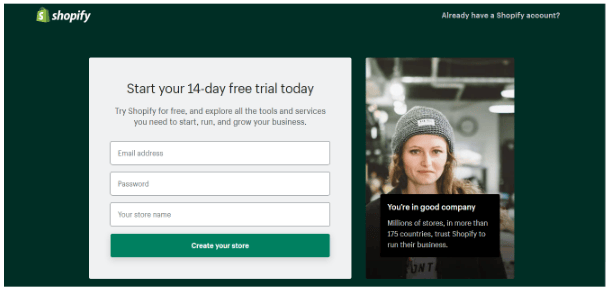
Shopify Homepage for Signing Up
Register for Shopify: Visit the Shopify website and click the "Get Started" button. Enter your email address, a unique store name, and password.
Upload a product and personalize your store. After signing up, you will see the new website's admin panel. Customize your store and add items. Visit the dashboard to customize the appearance of your online store, including themes, logos, colors, and more.
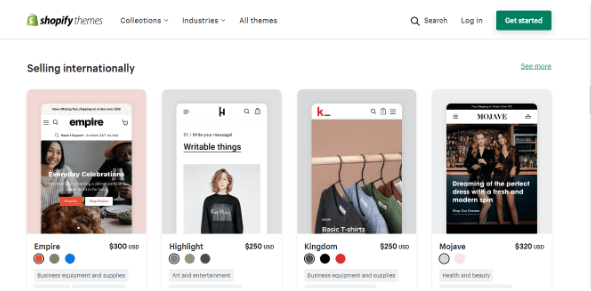
Shopify Theme Store For Selecting Themes
Set up your domain: On the dashboard, click the 'Add a Domain' button. You can either transfer an existing domain or register a new one. You can either buy a domain from Shopify or buy a domain name elsewhere and import it into Shopify.
Activate the payment processor. The Payments option on the dashboard allows you to select your payment processor. You can choose Shopify's payment processor for convenience.
How to Grow Your Store?
A web presence is only the beginning for an online store; attracting visitors, promoting products, and providing excellent customer service are critical to remaining competitive. The following strategies can help you expand your online store on Shopify.
Optimize Mobile Settings
Mobile devices make significant contributions to online browsing and purchase. To compete in the online economy and optimize sales, your online store must be mobile responsive.
SEO for Shopify
You must optimize your web store for SEO in order to increase traffic from search engines such as Google. Rank high among competitors in organic search to increase your everyday visitors. For example, posting blog entries increases traffic while improving your store's SEO. Additionally, SEO is less expensive than acquiring customers through paid advertising.
Create Some Ads
You may efficiently enhance your traffic by running advertising on Google and other networks. It is critical to first determine which platform your audience spends the most time on and which best fits your specialty. However, beware of rising costs.
Add Positive Reviews
Instead of praising your products/services, use social proof such as positive reviews and star ratings to assist customers make judgments faster. It also helps to develop a positive reputation and increase sales.
Social media integration helps to create an approachable brand for clients. It makes engaging with customers easier, resulting in a direct rise in sales. So, connect your Shopify store to Facebook, Pinterest, and Instagram.
Which Shopify Pricing Plan Would Be The Best for You?
Shopify provides five options to its customers, recognizing that price is a key component of every business. It also provides a 14-day free trial to test whether Shopify meets your needs. The plans are as follows.

Shopify Plans
Plan | Cost | Features |
Lite Plan | $9 per month 2% per transaction | It allows you to transform your current website into a selling platform by adding a ‘Buy’ button to your website. You also get some tools for selling on Facebook and accepting payments. |
Basic Shopify Plan | $29 per month 2.9% and 30¢ per transaction | It offers basic e-commerce functionality, including 24/7 supportUnlimited productsAn online store with a blogSales channelsA free SSL certificateDiscount codesManual order creationAbandoned cart recovery You can include two staff accounts. |
Shopify Plan | $79 per month 2.6% and 30¢ per transaction | In addition to the Basic Shopify Plan feature, you get the following benefits: Gift cards Professional reportsAddition of five staff accounts |
Advanced Shopify Plan | $299 per month 2.4% and 30¢ per transaction | Advanced reportingAbility to create custom reports Unlimited product uploads Ability to post as many videos and images as requiredAbandoned cart recovery |
Shopify Plus | $2000 per month 2.15% per transaction | Tailored-made solutions to your business model. Up to 18% higher conversion with Shop Pay.60% faster checkout. AR, video, and 3D media on product pages Localized shopping experiences Multiple stores, currencies, and languages.Advanced discounts and shipping rates99.99% uptime |
Note: Transaction fee is applicable only when not using Shopify payments
FAQs
What is Shopify POS?
Shopify Point of Sale (POS) is an app that allows for the offline sale of merchandise. It enables you to sell products in-person at physical stores, pop-up shops, trade exhibitions, and other events while accepting payments with your Android, iPhone, or iPad via the POS app.
Can I use Shopify from my phone?
Shopify is accessible from both the web and mobile devices. You may use the Shopify mobile app, log in to your account, and manage your online store. It also allows you to add staff accounts to help manage your firm, but the other associated accounts will have limited access, meaning they can only see the sections for which they have permissions.
Can I halt my Shopify store?
Store owners can use the Shopify admin panel to temporarily suspend or close their store. Shopify provides two options: store owners can suspend their store while continuing to work on it, or they can entirely pause their store. However, you are unable to halt your business during the free trial.
Conclusion
Become a marketing expert with Simplilearn’s Digital Marketing Job Guarantee Program. Learn how to use marketing tools, analyze marketing case studies of top businesses across the globe and land your dream job within just 180 days of graduation or get your money back.